
Published: October 29, 2026 | Category: Artificial Intelligence | Estimated reading time: 8–10 minutes
Artificial intelligence is no longer just a technology trend. It has become a practical tool for developers, students, content creators, marketers, and businesses looking to work more efficiently.
Whether you want to write code, create content, analyze documents, research a topic, or automate repetitive tasks, AI can help you get more done.
But with so many AI assistants available, one question keeps coming up:
Which AI tool is actually the best?
ChatGPT, Claude, Gemini, and Grok are among the most recognized AI assistants in 2026. Each offers powerful capabilities, but they don’t all excel at the same tasks.
In this guide, we’ll compare their strengths, limitations, and ideal use cases. We’ll also explore additional tools worth considering and help you choose the right AI assistant for your work.
ChatGPT — Best All-Round AI Assistant
Developed by: OpenAI
Website: https://chatgpt.com
Best for: Everyday productivity, programming, research, writing, and data analysis.
ChatGPT is one of the most versatile AI assistants available. It can help users move from an initial idea to a finished piece of work, whether that’s a business proposal, software feature, research summary, or presentation.
Its biggest advantage is the range of tasks it can handle within one environment.
Key strengths
- Programming: Explain code, debug issues, review implementations, and help build applications.
- Content creation: Draft articles, emails, documentation, and marketing material.
- Research: Search the web and prepare more detailed research reports using supported research tools.
- Data analysis: Work with spreadsheets, datasets, calculations, and visualizations.
- Visual creation: Generate and edit images using natural-language instructions.
- Productivity: Work with files, connected applications, and multi-step workflows where supported.
Where ChatGPT performs particularly well
Imagine you’re developing an e-commerce website.
You can use ChatGPT to plan the application architecture, generate React components, understand API errors, improve database queries, prepare product descriptions, and draft technical documentation.
This makes it useful for individuals and teams who regularly switch between different types of work.
Limitations
ChatGPT can still produce incorrect facts, misunderstand requirements, or generate code containing bugs. Its performance also depends on the selected model and available tools.
Our recommendation: Choose ChatGPT if you need one flexible AI assistant that supports a wide range of professional and personal tasks.
ecome a popular alternative for developers, researchers, and professionals handling complex information.
It is especially appealing when tasks require careful attention to instructions, extensive context, or well-organized written output.
Key strengths
- Code understanding: Review existing code, explain complex implementations, and suggest refactoring improvements.
- Long documents: Analyze reports, specifications, and large quantities of text.
- Professional writing: Produce structured articles, proposals, explanations, and documentation.
- Complex reasoning: Work through multi-step problems and technical requirements.
- Development workflows: Assist with implementation and coding tasks using supported developer tools.
Where Claude performs particularly well
Suppose you’re working on a large Next.js application with multiple components, API services, and business rules.
Claude can help you understand the existing architecture, identify repeated logic, design reusable components, and suggest cleaner approaches.
It is also useful when you need to turn complex information into clear, readable documentation.
Limitations
Claude is not guaranteed to produce better code than competing models. Results vary by programming language, task complexity, repository context, and model version.
Usage limits and tool availability also vary across plans.
Our recommendation: Consider Claude when your daily work involves code, technical documentation, lengthy requirements, or complex writing.
3. Google Gemini — Best Fit for Google Workspace Users
Developed by: Google
Website: https://gemini.google.com
Best for: Google ecosystem productivity, multimodal tasks, research, and collaboration.
Gemini is Google’s AI assistant and model family, with capabilities spanning text, image understanding, reasoning, and integration with supported Google services.
Its practical advantage becomes especially clear for individuals and businesses already using Google Workspace.
Key strengths
- Google Workspace: AI-assisted tasks in supported Google productivity applications.
- Research and learning: Explain concepts, summarize information, and explore topics.
- Multimodal understanding: Work with text, images, and other supported content formats.
- Business productivity: Help draft documents, organize information, and improve collaboration.
- Google ecosystem integration: Work across supported Google services and connected applications.
Where Gemini performs particularly well
Imagine your organization uses Gmail, Google Docs, Drive, and Sheets.
Gemini can help with supported workflows such as drafting documents, organizing information, summarizing content, and analyzing spreadsheet data.
This can reduce the time spent moving between different tools.
Limitations
Not every Gemini capability is available in every country, plan, or Workspace account. Some features require a supported subscription or administrator configuration.
Our recommendation: Choose Gemini if your daily work is heavily connected to Google products and you want AI capabilities integrated into that ecosystem.
4. Grok — Best Fit for Exploring Live Conversations and Trends on X
Developed by: xAI
Website: https://grok.com
Best for: Social media research, trending discussions, current topics, and general AI assistance.
Grok is an AI assistant developed by xAI. Alongside everyday chat, coding, and content generation, one of its distinctive capabilities is integration with X and live search tools.
This makes Grok worth considering when you want to explore current conversations and public reactions.
Key strengths
- X integration: Search and analyze public conversations on X using supported search capabilities.
- Trending topics: Explore breaking discussions and emerging interests.
- Content ideas: Generate social media angles and creative concepts.
- General assistance: Support writing, reasoning, programming, and research.
- Creative tools: Generate images and videos with supported Grok features.
Where Grok performs particularly well
Suppose your marketing team wants to understand what people are discussing about a new technology product.
Grok can help identify relevant posts, summarize recurring opinions, and highlight questions people are asking.
This can be a useful starting point for content planning and audience research.
Limitations
Social media discussions are not always representative, accurate, or verified. A trending claim should not automatically be treated as a fact.
Real-time information also depends on whether the relevant search tools are enabled.
Our recommendation: Consider Grok when your work involves X, social media conversations, and monitoring public discussions.
5. Perplexity — A Useful Tool for Source-Based Research
Website: https://www.perplexity.ai
Best for: Web research, discovering sources, and investigating questions.
Perplexity takes a search-focused approach to AI assistance. Rather than simply generating an answer from a prompt, it is designed to retrieve information, synthesize findings, and connect responses to sources.
Key strengths
- Web search with linked sources.
- Research across multiple websites.
- Fast exploration of unfamiliar topics.
- Useful starting points for market and competitor research.
- Follow-up questions that help narrow down an investigation.
Where Perplexity performs particularly well
Imagine you’re researching the latest trends in cloud computing.
Instead of manually opening numerous search results, you can ask Perplexity to explain the topic and identify relevant sources for further reading.
Limitations
A citation does not guarantee that a claim is accurate. Always open the linked source and verify important information, especially for legal, financial, scientific, and medical topics.
Our recommendation: Use Perplexity when finding and checking source material is central to your task.
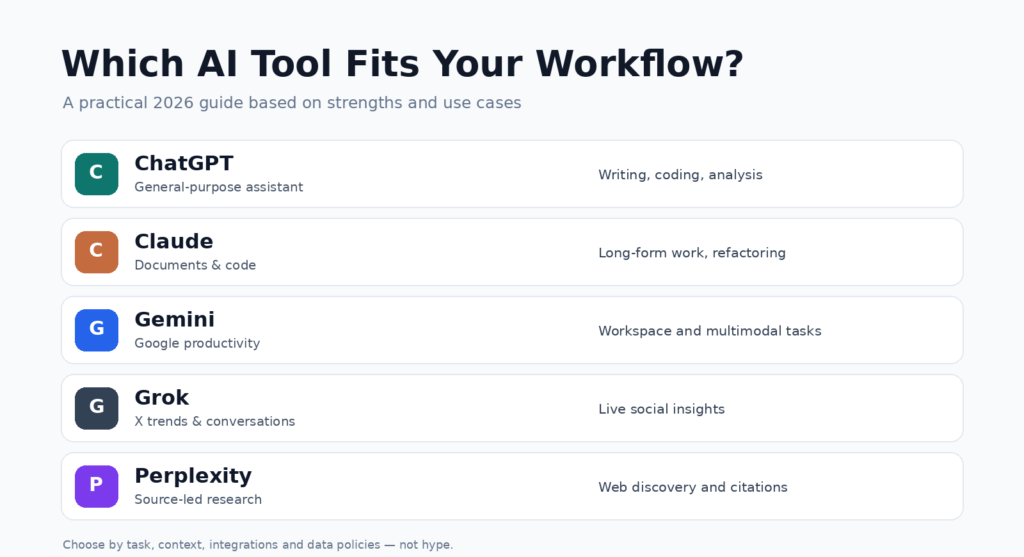
6. ChatGPT vs Claude vs Gemini vs Grok: Quick Comparison
The following comparison focuses on practical use cases rather than assigning unverified performance scores.
| AI tool | Particularly suitable for | Main consideration |
|---|---|---|
| ChatGPT | General productivity, coding, research, content, data | Broad capability across many tasks |
| Claude | Code review, technical writing, long documents | Strong document-oriented workflows |
| Gemini | Google Workspace, multimodal tasks, productivity | Integration with Google’s ecosystem |
| Grok | X discussions, current trends, content ideas | Access to live social conversations |
| Perplexity | Research, web discovery, finding sources | Search-oriented workflow |
Which AI should you use for coding?
ChatGPT and Claude are both strong options for software development.
For developers, the better choice often depends on whether you’re debugging a small function, planning a new application, refactoring an existing repository, or working with an AI coding agent.
You should test both against your actual codebase instead of relying on a universal ranking.
Which AI is best for writing?
ChatGPT and Claude are both worth trying for articles, technical documentation, professional communication, and creative content.
The most important factors are the quality of the final writing, how well the tool follows your instructions, and how much editing you need to perform.
Which AI is best for research?
Perplexity is a useful starting point for source discovery. ChatGPT, Gemini, Claude, and Grok can also support research through their available search and research features.
The best research workflow includes checking primary sources, comparing conflicting claims, and verifying dates.
Which AI is best for students?
ChatGPT and Gemini are practical options for explaining concepts, generating practice questions, and helping students understand difficult subjects.
Students should use AI to improve understanding rather than submitting generated answers without review.
Which AI is best for businesses?
There is no single answer.
A business using Google Workspace may benefit from Gemini’s integrations. A software company may prefer ChatGPT, Claude, or specialized coding agents. A marketing team analyzing X conversations may find Grok useful.
Security, privacy, administrative controls, pricing, and existing software integrations should all influence the decision.
7. Other AI Tools Worth Exploring in 2026
AI is not limited to conversational assistants. Specialized tools can often provide a better experience for particular tasks.
Cursor — AI-assisted software development
Website: https://cursor.com
Cursor provides AI-powered coding workflows within a code editor. Its agent capabilities can search a codebase, edit multiple files, run commands, and assist with debugging.
Best for: Developers working directly inside software projects.
GitHub Copilot — AI assistance inside development workflows
Website: https://github.com/features/copilot
GitHub Copilot helps developers with code suggestions, explanations, and supported agent-based development tasks.
Best for: Development teams already using GitHub and supported IDEs.
Canva — AI-assisted visual content
Website: https://www.canva.com
Canva combines design tools and AI-assisted creation features to help individuals and teams produce presentations, social media graphics, and marketing material.
Best for: Marketing teams, creators, and small businesses.
Runway — AI video generation and editing
Website: https://runwayml.com
Runway offers generative video tools and creative editing workflows for visual content production.
Best for: Video creators, creative teams, and marketing professionals.
8. How to Choose the Right AI Tool
Before paying for an AI subscription, consider these five questions.
1. What is your primary task?
Are you writing code, researching competitors, editing videos, preparing documents, or creating marketing assets?
Choose a tool that fits the work you perform most frequently.
2. How accurate does the output need to be?
For research and decision-making, prioritize source verification, transparent reasoning, and human review.
3. Does the AI integrate with your existing tools?
An assistant that works within your editor, documents, or business applications can be more valuable than one requiring constant copying and pasting.
4. What is your budget?
Many providers offer a free entry point, but advanced capabilities may require a paid plan. Compare usage limits, available models, and the actual cost for your workload.
5. How sensitive is your information?
Before uploading confidential business documents, customer records, or proprietary source code, review the provider’s data policies, account settings, and enterprise controls.
9. The Future of AI: From Answering Questions to Completing Work
One important development in AI is the shift from simple question-and-answer systems toward assistants that can carry out more complex workflows.
Instead of only answering, “How do I build this feature?”, AI systems are increasingly able to assist with planning, editing files, running tools, testing software, and coordinating multi-step tasks.
For businesses, this creates opportunities to improve productivity in customer support, development, marketing, operations, and research.
However, human oversight remains essential. Generated content, code changes, and automated actions should be reviewed according to their risks.
The most effective approach is not to remove human judgment but to combine it with AI tools that support better decisions and faster execution.
10. Final Verdict: Which AI Tool Is Best in 2026?
The best AI tool is the one that consistently helps you complete your actual work.
If you need a broad, versatile assistant, ChatGPT is an excellent starting point.
If your work involves complex coding tasks and detailed documents, Claude deserves serious consideration.
If you rely heavily on Google services, Gemini may fit naturally into your workflow.
If you regularly investigate conversations and trends on X, Grok offers a distinctive advantage.
If your priority is discovering sources and investigating topics, Perplexity is worth exploring.
For specialized tasks such as coding, graphic design, and video creation, tools like Cursor, GitHub Copilot, Canva, and Runway can complement these assistants.
You don’t necessarily need one AI tool for everything.
A practical combination might be ChatGPT or Claude for development, Perplexity for research, Gemini for supported Google Workspace tasks, and a specialized creative tool for design.
Start with one tool, evaluate it using real tasks, and expand your workflow only when another tool offers a clear benefit.
AI technology will continue to evolve, and today’s strongest choice may not remain the best option for every task tomorrow.
The key is to stay informed, experiment carefully, and use AI where it adds measurable value.
The information in this article reflects AI products and capabilities as of October 29, 2026. Features, pricing, availability, and model performance may change.